Cohesive Editorial Portrait Posters
Transform one portrait into four cohesive, high-fashion editorial posters with distinct layouts, sophisticated typography, and a refined magazine finish.
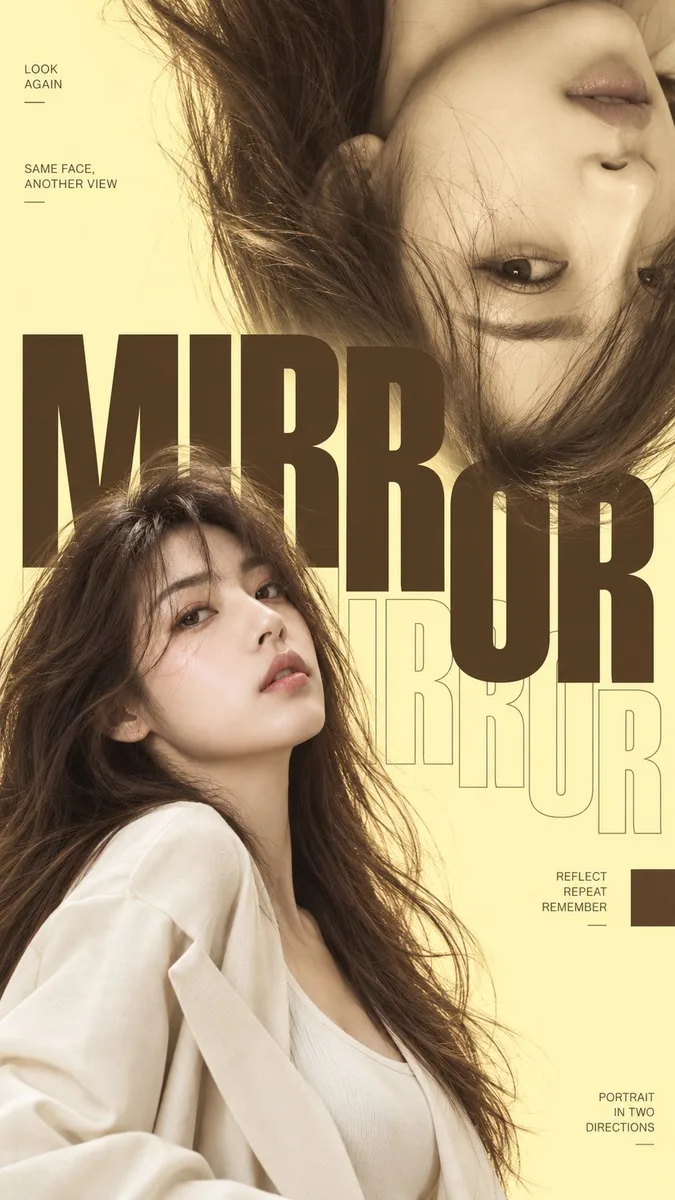
How to use this prompt
This template excels at transforming a single portrait into a cohesive series of high-end fashion editorial posters with distinct layout variations. It works best with advanced image models that support strong image referencing and text rendering, performing ideally at vertical aspect ratios like 9:16 or 4:5 for authentic magazine layouts.
To achieve the best results, carefully calibrate your variables. Pair the Subject Style with a refined Main Palette, such as butter yellow and deep cocoa brown, to maintain a soft, luminous aesthetic. Experiment with Typography Style options like oversized condensed sans-serif or elegant editorial serif to match the mood of the uploaded portrait, ensuring the text integrates harmoniously with the visual layers rather than overpowering them.
A common pitfall in multi-layout generation is style drift or unwanted text gibberish. If the model crowds the composition or introduces random borders and barcodes, simplify the Main Palette description and explicitly reinforce negative space. Ensure your source portrait has clean lighting and high contrast so the facial features remain distinct even when sliced or placed behind typographic elements.
Prompt Template
Portrait reference: [upload one portrait]
Main palette: [butter yellow / custom]
Accent color: [deep cocoa brown / custom]
Subject style: [{subject_style} / custom]
Aspect ratio: {aspect_ratio}

Use the uploaded portrait to create four separate fashion-editorial portrait posters from the same visual system. Keep the same person, facial identity, hairstyle, outfit direction, photographic realism, color palette, typography family, and overall art direction across all four images.

Use a bright, low-saturation editorial palette: {main_palette}. Keep the image luminous, soft, refined, and visually striking rather than highly saturated.

Create these four layout variations:

1. MIRROR
   Show the same portrait twice, with one normal portrait and one enlarged 180° flipped portrait entering from the opposite side. Add oversized horizontal typography with a subtle outline echo. Let the portraits and letters overlap naturally.

2. TRACE
   Use a large warm-toned close-up portrait on one side and a smaller full-color portrait on the other. Place oversized condensed typography vertically between them as a strong visual spine, with letters moving in front of and behind the subject.

3. GLOW
   Use huge condensed typography as the dominant composition. Place the portrait behind the letters so the eyes, lips, hair, and shoulders appear through and between the letterforms. The subject should feel integrated into the type rather than simply covered by it.

4. DRIFT
   Slice the portrait into several clean horizontal photographic sections and slightly shift them left and right. Keep the face recognizable and attractive while allowing the hair and facial features to create a soft drifting motion. Avoid digital glitch effects.

Maintain realistic skin texture, natural hair strands, believable fabric folds, soft fashion photography lighting, and a refined magazine-editorial finish.

Use {typography_style}, meaningful small editorial copy, thin rules, small geometric blocks, and controlled negative space. Keep the hierarchy clear: portrait and oversized typography first, supporting text second.

All four posters should feel visually related but clearly use different composition systems.

Full-bleed design only. Do not add an outer border, poster frame, white margin, NO., VOL., numbering, barcode, sparkle symbols, random placeholder text, complex UI elements, RGB glitches, or decorative clutter.

Generate the four posters as separate standalone {aspect_ratio} images, not combined into one collage.
Tunable variables (4)
- Aspect Ratio — Choose the canvas aspect ratio.
- Main Palette — Specify the background, supporting, and typography colors.
- Subject Style — Describe the person or character attributes.
- Typography Style — Select the typography aesthetic for the poster.
Tags
portrait editorial poster fashion
Type: AI-Generated Community Prompt. Sample images are generated with AI models and serve as baseline references only. Prompts are parameterized for transformative search & educational customization.